Building an agent harness from scratch (Part 1)
In October of 2025, I finally decided to give a shot at Claude Code, and how I coded has largely changed since. I’m sure we all have some version of the same story. What mostly impressed on me is how a seemingly simple, or as I had believed at the time, LLM call can have such an impact once you arm it with tool calling. Agent Harness became the word that dominated the first half of this year. Then some time in March/April, the Claude Code repository leaked, and I basically locked in. What I was curious about was how does one go about building an effective Agent, and what even is an agent? What makes up context and how are LLM messages handled? So I set out to build my own harness development kit (mini-agent-kit), and in this blog, I’d like to share some of my learnings.
So what is an Agent?
Before I go over what an agent is, I think it is important to understand how we interact with a language model(LLM for short).
from openai import OpenAI
client = OpenAI()

messages = [
    {"role": "system", "content": "You are a helpful assistant."},
    {"role": "user", "content": "Hello!"}
]

def llm_call(messages):
    completion = client.chat.completions.create(
        model="gpt5",
        messages=messages
    )
    return completion.choices[0].message
The above code snippet shows how we go about making an LLM request. At the most basic level, there is a collection of messages made up of a system and user prompt. The LLM would take this collection, and return an assistant message in response to the user prompt. If we wrap this function in a loop:
while True:
    prompt = input("> ")
    messages.append({"role": "user", "content": prompt})
    llm_out = llm_call(messages)
    messages.append(llm_out.model_dump())
We get a very simple chat application, and this is very straight forward. What we can then do is give our chat application a set of tools. And let’s use the classic example for tools, getting the weather. Suppose we have some weather API that given a city would return the temperature.
def get_weather(city):
    # pretend this hits a real weather API
    return f"It's 72F and sunny in {city}."
To get an LLM to use this API, we define a JSON schema instructing the LLM to look for parameters required by this function:
tools = [
    {
        "type": "function",
        "function": {
            "name": "get_weather",
            "description": "Get the current weather for a given city",
            "parameters": {
                "type": "object",
                "properties": {
                    "city": {
                        "type": "string",
                        "description": "The city to get the weather for"
                    }
                },
                "required": ["city"]
            }
        }
    }
]
Next, we pass tools into the request:
def llm_call(messages):
    completion = client.chat.completions.create(
        ...
        tools=tools
    )
    return completion.choices[0].message
And encode this into the loop to actually run the tool when the model asks for one:
while True:
    prompt = input("> ")
    messages.append({"role": "user", "content": prompt})
    llm_out = llm_call(messages)
    messages.append(llm_out.model_dump())

    if llm_out.tool_calls:
        for tool_call in llm_out.tool_calls:
            args = json.loads(tool_call.function.arguments)
            result = get_weather(**args)
            messages.append({
                "role": "tool",
                "tool_call_id": tool_call.id,
                "content": result
            })
        llm_out = llm_call(messages)
        messages.append(llm_out.model_dump())
This way, when a user asks, “What is the weather in London?”, the model returns a message with tool_calls which should have the keywords extracted, i.e London in this case. This way we can then run the get_weather() function, append a message back with the response of the API, and our LLM is now able to interact with the outside world.
So what is an agent? What we just did here, is a very simple form of an agent. There are tools to interact with the outside world, and more importantly, a loop. I would, however, be lying to you if I stopped here and claimed this for an agent. So let’s dive a bit deeper.
ReAct
In 2023, Yao et al. [1] published ReAct, short for Reasoning + Action. Their key idea was to interleave reasoning traces with actions: the model verbalizes a thought, takes an action, observes the result, and uses that observation to inform its next thought, repeating this cycle until the task is done.


Consider our example in the previous section, where we ask the LLM what the weather is in London. An agent in this case would reason that it needs to get the weather of London by calling on the weather API(which is available to it), and take the action by calling it. Or consider a coding agent: its primary goal is to solve coding tasks specified by the user, and it does so by repeatedly reasoning about what to do next and acting on its environment via tools: writing new code, running tests, or editing existing files, until the task is done.
It is important to note that an agent has a task it generally needs to achieve. It accomplishes this task by reasoning at each turn about what it needs to do, which is generally to invoke one of its available tools. So as not to conflate the two terms, it’s worth noting the distinction between the Agent and the LLM: the Large Language Model is what possesses the ability to reason and recognize that it needs to invoke a tool; the Agent is the abstraction that wraps the LLM with a task and a loop to accomplish that goal.
With that intuition in place, here is a more formal definition:
An Agent is a system that leverages an AI model to interact with its environment in order to achieve a user-defined objective. It combines reasoning, planning, and the execution of actions (often via external tools) to fulfill tasks.
— Hugging Face, Agents Course: What are Agents? [2]
So what does it mean in practice?
To piece everything together, let us first revisit the earlier code we drew up:
while True:
    prompt = input("> ")
    messages.append({"role": "user", "content": prompt})
    llm_out = llm_call(messages)
    messages.append(llm_out.model_dump())

    if llm_out.tool_calls:
        for tool_call in llm_out.tool_calls:
            args = json.loads(tool_call.function.arguments)
            result = get_weather(**args)
            messages.append({
                "role": "tool",
                "tool_call_id": tool_call.id,
                "content": result
            })
        llm_out = llm_call(messages)
        messages.append(llm_out.model_dump())
Even though we previously called this an agent loop, the key thing that is missing here, is the ability for the agent to finish a task. Here, we make one model call, which might decide to invoke a tool, call it and make one final model call. This is problematic because, reasoning and action can happen over many steps, and not just one. The other thing, we also want to do is add a layer of abstraction. Earlier we learnt that the way to interact with a LLM is to pass in a messages list, and we also see that, every model output including tool call and its invocation outputs are all appended back to the list. We’ll give this a name: the Context. It’s the abstraction for everything that goes into the model on each call/turn/step, and the agent’s whole job is to grow and manage it. With these framings, the loop becomes:
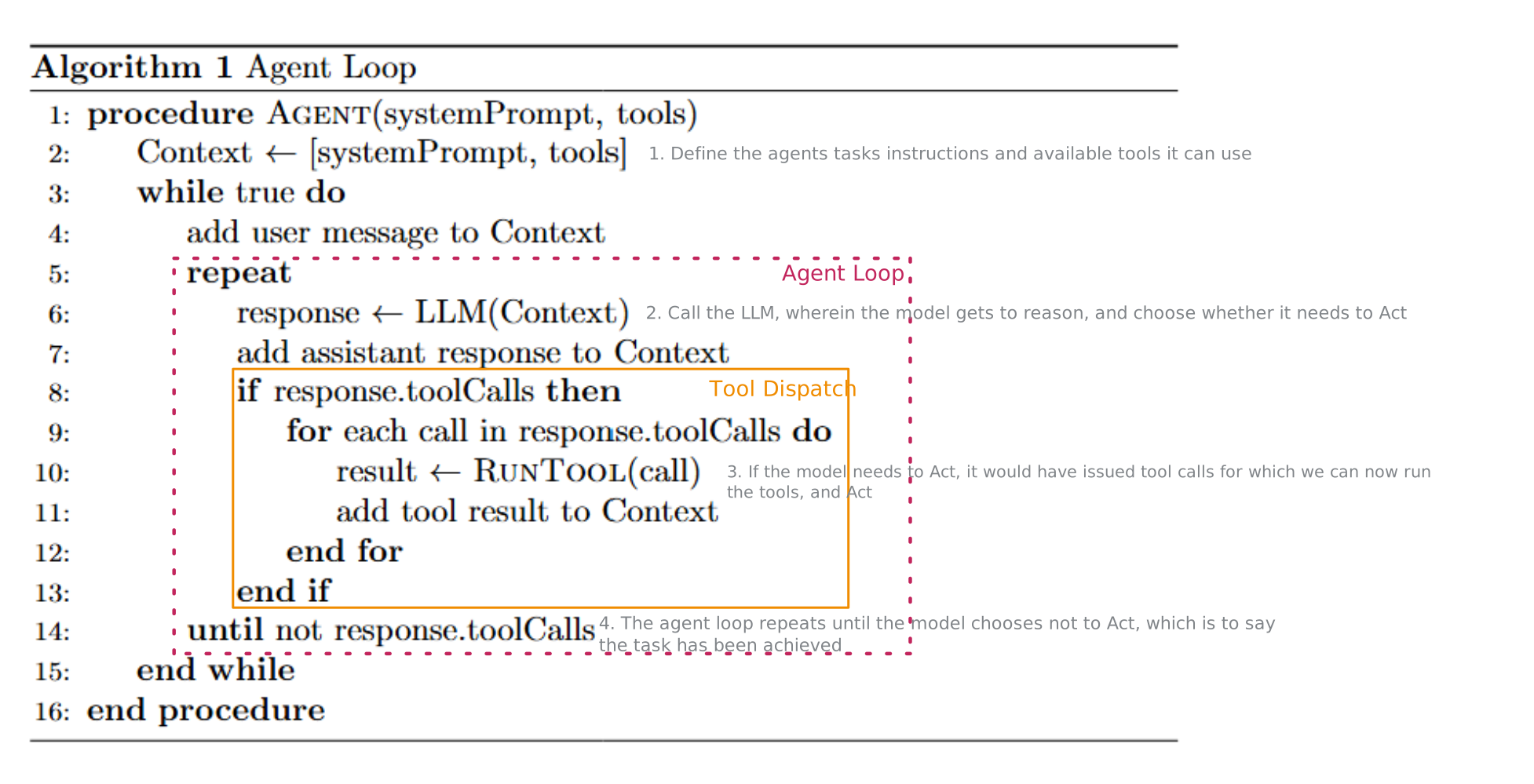
We now have an outer loop, which is largely responsible for taking a user input, i.e a task, and an inner loop that performs the reason->act->observe cycle until the task is accomplished. And just like before, within the inner loop, we have a for-loop that goes over every tool_call the model issued which is then passed into the process that will execute the tool call. Throughout this cycle, we now maintain this Context object that simply captures the following: the system prompt, tool definitions, user input, tool call and results, and a final output. It is worth calling out, however, that this Context object(and as Claude would say it) is loadbearing. How one designs the Context determines the following:
- What the agent needs to accomplish, i.e., coding, research, etc.
- What environment is the agent operating in? Is there a git repo, or is there sensitive information that needs redaction before passing it to a model.
- What the LLM sees on each turn. Does it see the whole history, a compacted version, or a sliding window?
- Does it keep all past tool results or surgically keep the important ones.
- And many more
The important thing to understand is that an agent has agency and so does the designer of the system who dictates how the agent will interact with the environment. With that being said, let’s write some good, and update our naive loop.
Context
First, let’s build out our simple Context object. It should be able to 1) add messages to some message store, and 2) should be able to get messages from the store. At the heart of it is a projection strategy which is responsible for assembling the system prompt and messages from the store.
class Context:
    def __init__(self, system_prompt: str):
        self.system_prompt = system_prompt
        self.messages: list = []

    def add(self, message):
        self.messages.append(message)

    def get_messages(self):
        return self.project().copy()

    def project(self):
        """The projection strategy: the messages the LLM should see.

        Default: everything in the store. Override to implement a sliding
        window, summarization, token-aware truncation, etc.
        """
        system_message = {"role": "system", "content": self.system_prompt}
        return [system_message] + self.messages
You may rightfully ask as to why we created two seperate functions to get messages, and that’s valid. We do this so that in the future, we have maximal flexibility as to what we display to the model. Consider the scenario where the number of tokens in the messages exceed the token budget of the model, in which case we may either want to apply some form of compaction strategy or apply some form of sliding window over the most recent messages.
This ties back to what I mentioned earlier about the agency of the designer of the system. As the designer, we should have the flexibility to choose what we show to the model, and it doesn’t necessarily have to be exactly what the user asked. We can, in effect, inject environmental context about where the agent will operate in, or choose to offload all prior tool calling results in order to save the agent from hitting the model’s token budget. Think about Claude Code, which has a system prompt that dictates how the system should behave, and then there are the Claude.md files, Memory.md files, Skills, etc it needs to assemble. These are things that can happen here in project() without altering the original list of messages.
Tool Dispatch
The next thing we should knock out is a mechanism to run the tools that the model chooses to call. We can keep this simple, and have a factory that runs a tool based on the name of the tool the model calls.
def run_tool(tool_call):
    name = tool_call.function.name
    args = json.loads(tool_call.function.arguments)

    if name == "get_weather":
        result = get_weather(**args)
    else:
        result = f"Unknown tool: {name}"

    return {
        "role": "tool",
        "tool_call_id": tool_call.id,
        "content": result
    }
Agent Loop
And lastly, for the agent, we’ll implement Algorithm 1 from before. The Agent will generally take an LLM instance, a system prompt, its tool list and we’ll also specify a max_turns parameter to control how long the agent will run. Lastly, for the loop itself, we’ll define a run() method that implements the algorithm itself.
class Agent:
    def __init__(self, llm, system_prompt, tools, max_turns=10):
        self.llm = llm
        self.context = Context(system_prompt)
        self.tools = tools
        self.max_turns = max_turns

    def run(self, prompt):
        self.context.add({"role": "user", "content": prompt})

        for _ in range(self.max_turns):
            llm_out = self.llm.call(self.context.get_messages(), self.tools)
            self.context.add(llm_out.model_dump())

            if llm_out.tool_calls:
                for tool_call in llm_out.tool_calls:
                    self.context.add(run_tool(tool_call))
            else:
                return llm_out.content
And since we previously established that the Agent and the LLM are to be two seperate entities, let’s also codify the LLM class.
class LLM:
    def __init__(self, model="gpt5"):
        self.client = OpenAI()
        self.model = model

    def call(self, messages, tools):
        completion = self.client.chat.completions.create(
            model=self.model,
            messages=messages,
            tools=tools
        )
        return completion.choices[0].message
Note
One benefit of using the OpenAI client is that a lot of LLM providers expose a OpenAI compatible server, which generally lets you run their models on it.
Putting it all Together
And lastly, we’ll initialize our simple Agent, and run it.
tools = [
    {
        "type": "function",
        "function": {
            "name": "get_weather",
            "description": "Get the current weather for a given city",
            "parameters": {
                "type": "object",
                "properties": {
                    "city": {
                        "type": "string",
                        "description": "The city to get the weather for"
                    }
                },
                "required": ["city"]
            }
        }
    }
]

llm = LLM(model="gpt5")
agent = Agent(
    llm=llm,
    system_prompt="You are a helpful assistant.",
    tools=tools
)

while True:
    prompt = input("> ")
    response = agent.run(prompt)
    print(response)
Harness: Beyond the Loop
this will eventually be filled out
References
[1] Yao, S., Zhao, J., Yu, D., Du, N., Shafran, I., Narasimhan, K., & Cao, Y. (2023). ReAct: Synergizing Reasoning and Acting in Language Models. International Conference on Learning Representations (ICLR). https://arxiv.org/abs/2210.03629
[2] Hugging Face. (n.d.). Agents Course: What are Agents? https://huggingface.co/learn/agents-course/en/unit1/what-are-agents
Enjoy Reading This Article?
Here are some more articles you might like to read next: